Skip navigation
πŸŽ‰
New Year Special!|Limited Time 50% OFF!
00:00:00:00

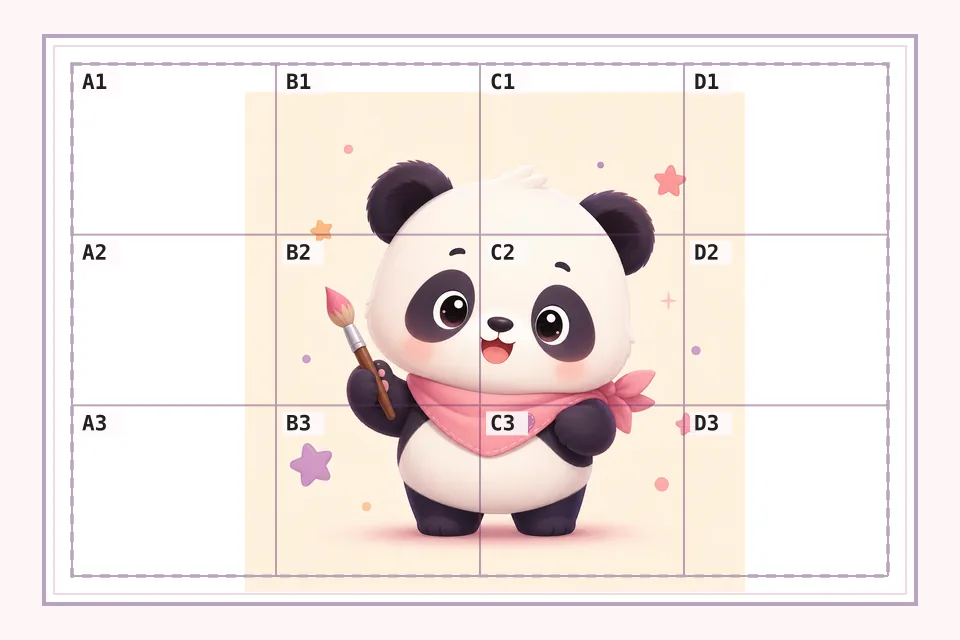
Cross Stitch Grid MakerAdd a printable grid to any reference image for counting squares, marking A1/B2 coordinates, and preparing a simple cross stitch reference sheet.

β– Count Squares Faster Β· Coordinate labels make it easier to discuss and find exact areas on a printed reference.

β– Simple Printed Reference Β· Use paper size notes to recreate the same grid on your working sheet.

β– Black & White View Β· Switch to grayscale when color is distracting and you only need value or outline guidance.

↑

Upload Cross Stitch Reference

Drop a JPG, PNG, or WebP image here to add a printable cross stitch grid.

Grid Preview
Grid Preview

β–§ Upload Cross Stitch Reference

Printing Guide

PNG output size:840Γ—1188px

For a A4 print (210Γ—297mm):

Draw 14 vertical lines at 14.0mm intervals.

Draw 14 horizontal lines at 19.8mm intervals.

Label each cell from A1 to O15.

βš™ Grid Settings

β–€ Paper Format

⬇ Image

What is a cross stitch grid maker?

A cross stitch grid maker adds a printable square grid to your reference image so you can count areas, mark coordinates, and plan where details sit before stitching. This first version is intentionally simple: it creates a gridded reference image, not a full DMC symbol chart or floss shopping list.

This cross stitch grid maker is designed for makers who want a simple image grid before building a full pattern. Upload a picture, choose the number of rows and columns, show A1/B2 coordinate labels, and create a printable cross stitch reference sheet in the browser.

Use it when you need a photo to cross stitch grid, a counted cross stitch grid, or a printable cross stitch grid for planning. It helps you compare image areas, mark sections, simplify value with black-and-white mode, and discuss exact locations with row and column labels.

The tool is intentionally focused on grid overlay rather than floss conversion. It gives you image upload, line color, opacity, paper-size notes, custom paper dimensions, and PNG download so you can prepare a clean cross stitch grid reference quickly.

Common names and search terms

cross stitch grid makercross stitch grid generatorprintable cross stitch gridphoto to cross stitch gridA1 B2 grid labelscounted cross stitch gridimage grid for cross stitch

Why stitchers use image grids

A coordinate grid helps you split a reference into manageable sections. Instead of guessing where a shape starts or ends, you can locate it by row, column, and nearby grid lines.

Count Squares Faster

Coordinate labels make it easier to discuss and find exact areas on a printed reference.

Simple Printed Reference

Use paper size notes to recreate the same grid on your working sheet.

Black & White View

Switch to grayscale when color is distracting and you only need value or outline guidance.

How to make a cross stitch grid

Upload

Choose the image you want to use as a cross stitch reference.

Grid

Set the rows, columns, line style, and coordinate labels.

Print

Download the gridded image and use the spacing guide for your paper format.

Cross stitch grid features

Grid Reference

  • Custom row count
  • Custom column count
  • A1/B2 coordinate labels
  • Printable square reference layout

Paper Planning

  • A4, Letter, Legal, and large paper presets
  • Custom paper dimensions
  • Millimeter spacing guide
  • Line count for manual drawing

Image Output

  • Image upload and preview
  • Black and white conversion
  • Line color and opacity controls
  • PNG download with labels

Cross Stitch Grid Generator

Add a square grid and A1/B2 labels to a reference image so you can count areas and locate details faster.

Photo to Cross Stitch Grid

Convert a photo into a gridded visual reference for planning, tracing, value checks, or beginner stitch practice.

Printable Cross Stitch Grid

Use paper presets and spacing notes to print the grid or redraw it on a worksheet before stitching.

Popular cross stitch grid uses

Reference Counting

Use rows, columns, and A1/B2 labels to find areas faster while comparing a picture to your fabric.

Black & White Planning

Convert the reference to grayscale when value and outline matter more than color.

Printed Work Sheets

Create a simple gridded printout for notes, counting, and stitch planning.

Beginner Practice

Learn to read picture areas square by square before moving to complex charts.

Embroidery Drafting

Use a grid as a rough layout guide for embroidery, needlework, and small craft designs.

Pattern Discussion

Share coordinates like B4 or G7 when discussing changes with another maker.

Loved by Cross Stitch Grid Users

Stitchers and embroidery makers use the grid to count areas, mark coordinates, and prepare printable reference sheets.

E

Emily

Cross Stitch Beginner

The A1/B2 labels make the reference much easier to follow. I use the grid before deciding whether a picture needs a full pattern chart.

Verified maker
S

Sarah

Needlework Hobbyist

I upload a small image, switch to black and white, and print the cross stitch grid as a planning sheet. It is simple and fast.

Verified maker
J

Jessica

Embroidery Seller

The printable cross stitch grid helps me discuss exact areas with customers. Saying C4 or H7 is much clearer than pointing at a screenshot.

Verified maker
Y

Yuki

Pattern Planner

This is not a DMC converter, which is exactly why I like it. It gives me a clean image grid before I commit to making a full chart.

Verified maker
C

Chloe

DIY Crafter

The paper size guide is useful when I want to redraw the grid by hand. A 15 x 15 start is readable for most references.

Verified maker
O

Olivia

Embroidery Teacher

I use it for beginner exercises because students can see how a picture breaks into smaller counted sections.

Verified maker

cross stitch grid maker pricing

Start with free watermarked downloads, then upgrade for no-watermark PNG exports and unlimited downloads.

Starter

Free

For occasional reference grids and trying the tool

$0Free forever
Grid Tool
  • β– Upload an image and start with a 15 x 15 grid
  • β– Adjust rows, columns, color, opacity, and line width
  • β– A4, A5, Letter, Legal, A3, A2, and custom paper sizes
Free Limits
  • β– PNG downloads include a beadpattern.net watermark
  • β– 3 PNG downloads per month, login required
Subscription

Pro

For creators who need frequent no-watermark grid downloads

$4.98
$2.49/mo
Billed $29.90/yearSave $5.98
Grid Tool
  • β– Full grid controls and paper format settings
  • β– Black and white mode plus A1/B2 coordinate labels
  • β– Local browser preview without server upload
Upgrade Unlocks
  • β– No-watermark PNG downloads
  • β– Unlimited monthly downloads
  • β– Better for classrooms, drawing transfer, and repeated print guides
One-time

Lifetime

One-time access for long-term no-watermark downloads

$79.80
$39.90one-time
Grid Tool
  • β– Full grid controls and paper format settings
  • β– Black and white mode plus A1/B2 coordinate labels
  • β– Local browser preview without server upload
One-Time Access
  • β– No-watermark PNG downloads
  • β– Unlimited download access
  • β– Long-term access to image grid tools and premium site features

Do not want a subscription? Buy permanent exports

Each full export uses 1 credit and never expires. Best for occasional pattern makers.

20 Export Credits

Never expires, about $0.20 per full export

$3.99one-time
  • β– Full no-watermark exports
  • β– Unlocks Pro-size canvas while credits remain
  • β– No subscription benefits included
Recommended

30 Export Credits

Never expires, about $0.20 per full export

$5.99one-time
  • β– Full no-watermark exports
  • β– Unlocks Pro-size canvas while credits remain
  • β– No subscription benefits included

100 Export Credits

Never expires, about $0.20 per full export

$19.99one-time
  • β– Full no-watermark exports
  • β– Unlocks Pro-size canvas while credits remain
  • β– No subscription benefits included

Payments on beadpattern.net are securely processed by Stripe.

Professional human support is available 24/7, and emails are answered within 1 business day.

To cancel a subscription, ask billing questions, or change plans, contact support@beadpattern.net

Cross Stitch Grid Maker FAQ

No. This page creates a printable image grid. It does not generate DMC colors, symbols, floss lists, or stitch counts.

Start Your Free Cross Stitch Grid Now

Upload a reference image, add a printable cross stitch grid, mark coordinates, and download a clean PNG guide.